Featured project
netlld: living network design docs
Writing a Low-Level Design for a data-center fabric takes days, and it's out of date the moment the network changes. netlld generates it from the network itself, from Arista AVD data or from the switches' running-configs, and turns that design back into AVD.
3-minute walkthrough
How it works, in my own words
Seven flows
Everything netlld does, one diagram at a time
- The whole system
- Generating a design in the web app
- Documenting a fabric from its configs
- From the design back to Arista AVD
- Checking the design against the live network
- Living documentation in CI
- Getting access
- All diagrams
- the fabric model / your design
- the live network and signed-in users
- a check
- verification or read-only data
Flow 1 of 7
The whole system
One fabric model sits in the middle. Every input turns into it, and every output comes from it.
- Two ways in: the hosted web app, or the command-line tool for AVD repos and plain running-configs.
- Everything generated comes from the same model, so the LLD, SOW and project plan can't disagree.
- The dashed lines are checks: did AVD build what the design says, and is the live network still doing it?
Flow 2 of 7
Generating a design in the web app
Pick a starting point, and one request produces every document.
- Five ways to start: a sample, spine and leaf counts, the full form, the discovery-call workshop, or an upload of running-configs or AVD YAML.
- The pipeline runs in this order on every request. Nothing is sent to an AI service in the hosted app.
- Generated files are kept for 7 days, and each run is logged with who ran it.
Flow 3 of 7
Documenting a fabric from its configs
No AVD, no automation: just the switches' running configs.
- Addressing, ASNs, VNIs, MLAG, SVIs and endpoints are read as written.
- Only three things have to be worked out, and each has a fixed rule instead of a guess.
- Works in the web app (upload or paste configs, or try the sample configs) and in the command-line tool.
Flow 4 of 7
From the design back to Arista AVD
Export, build, verify, and only then deploy.
- Pinning is the default because renumbering a live underlay drops every session on it.
- Opting out (--no-pin-underlay) lets AVD re-derive the addresses, and compare.py reports every one that moves.
- Run end to end against arista.avd 6.3.0 for both input paths.
Flow 5 of 7
Checking the design against the live network
Is the network still doing what the document says?
- Every source produces the same shape, so the check never needs to know where the state came from.
- CloudVision supplies the device list; the state itself still comes from the switches over eAPI.
- A non-zero exit on critical drift lets CI or a scheduled job raise the alarm.
Flow 6 of 7
Living documentation in CI
The document rebuilds itself whenever the fabric changes.
- The change log comes from git history alone: the previous commit's fabric is rebuilt and compared.
- The verify-avd job also checks that an unpinned export still fails, so the comparison can't silently stop working.
- The audit pack is the as-built evidence reviewers ask for alongside the LLD.
Flow 7 of 7
Getting access
Invite-only: every person is approved one at a time.
- The form asks for name, work email, company, role, LinkedIn and use case, and blocks bots and repeat requests.
- Only a hash of each sign-in link is stored. “New link” replaces a forwarded one.
- Revoking takes effect on the person's very next click.
Diagrams
Every diagram, straight from the project
netlld draws three topology views for every fabric it documents. These are its real output for two synthetic example fabrics, plus the two system diagrams from the repo.
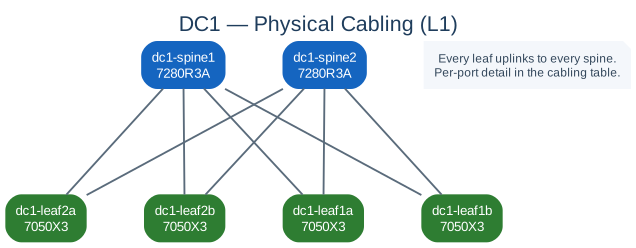
Two 7280R3A spines and four 7050X3 leaves. Every leaf uplinks to every spine.
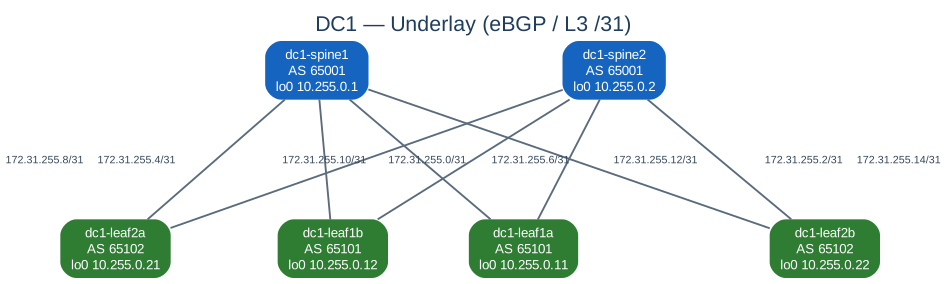
Per-device AS numbers, loopbacks and the /31 on every point-to-point link.
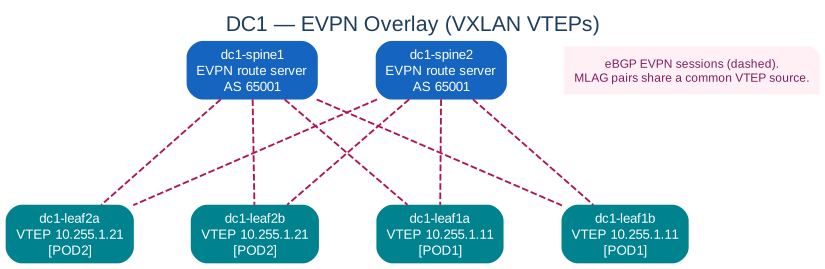
Spines as EVPN route servers, eBGP EVPN sessions dashed. MLAG pairs share one VTEP address.
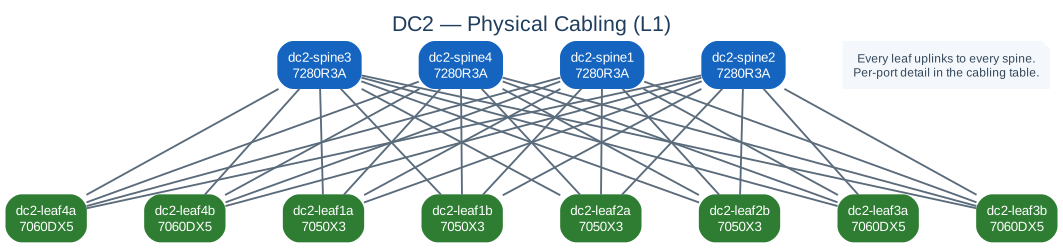
Four spines and eight leaves across 7050X3 and 7060DX5 platforms.

Every spine-leaf link with its /31. Wide by design: scroll sideways or open full size.

Four EVPN route servers and eight VTEPs across four pods.
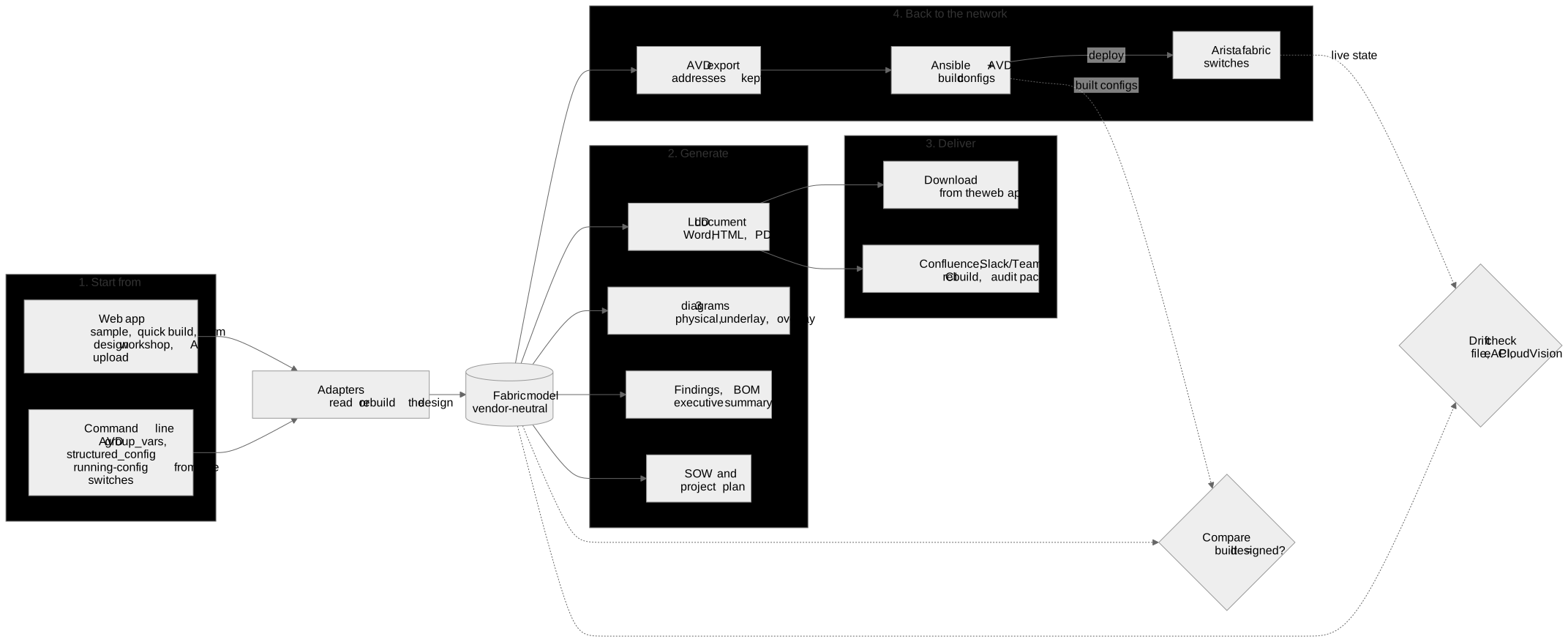
Inputs become one fabric model; it generates and delivers the documents, exports back to AVD, and is checked by compare and drift.

How a visitor requests access, how I review it, and how sign-in links are issued and revoked.
Try it
Invite-only preview
If you run Arista EVPN/VXLAN fabrics, request access and tell me what you'd use it for. I review every request myself and send a personal sign-in link. Feedback from real fabrics is the most useful thing you can give me.
Independent project, built and maintained by me. Not affiliated with Arista Networks or my employer. All sample data shown is synthetic.